Data Repair Icons: A Versatile Asset for Modern Digital Design
In the fast-moving world of digital design, icons have become one of the most powerful tools for communicating complex ideas instantly. They reduce cognitive load, improve user experience, and add a layer of professionalism to any project. Among the many icon sets available today, Data Repair Icons stand out as a purposeful and practical choice for anyone working with themes of technology, system recovery, troubleshooting, or data management. These icons are not only visually simple and clean but also highly adaptable across a wide range of media — from websites and mobile apps to printed materials like flyers and posters.
Designers, marketers, developers, and content creators alike often search for icon sets that balance clarity with customization. The Data Repair Icons collection addresses this need directly by offering 100 vector-based designs that can be resized, recolored, or restructured without losing quality. Whether you're building an app interface, designing an infographic about cybersecurity, or creating social media visuals for a tech brand, these icons provide a consistent visual language that reinforces your message.
What Makes Data Repair Icons Unique?
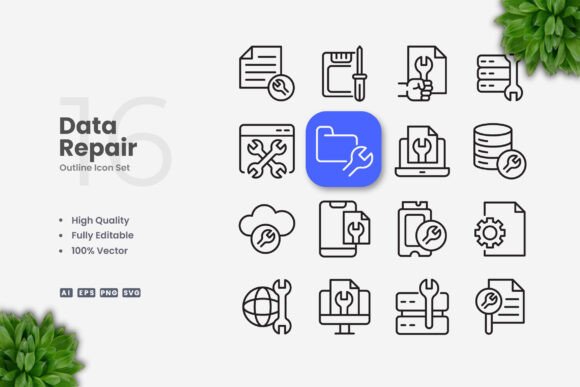
At the core of every great icon set lies simplicity. But simplicity alone is not enough — the icons must also be meaningful, scalable, and easy to modify. The Data Repair Icons set embodies these qualities. Each icon is crafted with a minimalistic approach, ensuring that the subject matter (repair tools, hard drives, cloud sync, error signals, recovery symbols) is instantly recognizable without unnecessary detail.
One of the standout characteristics of this collection is its editable stroke. Many icon sets lock you into a fixed line weight, making it difficult to align them with your brand's visual system. With Data Repair Icons, you can adjust the stroke weight in vector editing software like Adobe Illustrator or CorelDRAW, ensuring consistency across different sizes and contexts. This flexibility is particularly valuable when you need icons to match the thickness of typography or other UI elements.
Additionally, all icons are delivered in multiple file formats: AI (Adobe Illustrator), EPS Version 10, SVG, and PNG with transparency. The inclusion of a source file and a Readme.txt means you have everything you need to get started quickly. The PNG files are ready for immediate use, while the vector formats allow for deep customization.
Key Features That Support Modern Workflows
Modern design projects demand efficiency. Whether you are a solo freelancer or part of a large creative team, the ability to drag, drop, and edit assets without friction can make or break a deadline. The Data Repair Icons set is built with this in mind.
- 100% Vector Graphics: Every icon is vector-based, meaning you can scale them from a tiny mobile button to a large poster without any loss of sharpness. This is essential for responsive web design, where icons must look crisp on retina displays and high-resolution screens.
- 100% Customizable: Change colors, modify shapes, combine elements, or rotate icons — the possibilities are limited only by your creativity. Because the icons are built with clean paths, editing is straightforward even for designers who are not advanced in vector software.
- Editable Stroke: As mentioned earlier, this feature gives you control over line thickness. You can make icons bolder for headings or lighter for subtle background use, all within a few clicks.
- Easy Drag and Drop: The file organization and naming conventions are intuitive, so you can find the icon you need and place it directly into your design environment without searching through layers of folders.
These features directly address common pain points: the need for fast iteration, brand consistency across media, and asset reuse without quality degradation. For a designer working on a mobile app interface, for instance, being able to adjust stroke weight to match the UI's typography is a huge time-saver.
Websites and Mobile Apps
User interfaces thrive on clarity. In a dashboard that monitors server health or system performance, Data Repair Icons can indicate status updates, repair actions, or data recovery processes. Their clean lines ensure they don't clutter the interface, while their thematic relevance reinforces user trust. For mobile apps, where screen real estate is limited, the simplicity of these icons helps maintain a tidy layout without sacrificing meaning.
Social Media Graphics
Tech brands, IT service providers, and cybersecurity consultants often share tips, offers, or educational content on platforms like LinkedIn, Instagram, and Twitter. Using a consistent set of icons — such as a wrench over a hard drive or a checkmark on a data cloud — makes posts more scannable and professional. The Data Repair Icons set works beautifully in square, portrait, or landscape formats, and the PNG transparency means you can overlay them on any background without extra editing.
Books and eBooks
Technical guides, troubleshooting manuals, and computer science textbooks benefit from visual aids that break down complex procedures. Icons that represent steps like "backup," "restore," "scan," or "fix" help readers follow instructions more easily. Because the icons are vector, they print sharply at any resolution, whether in a paperback or a high-resolution PDF.
Infographics and Flyers
Infographics rely on visual hierarchy and repetition of simple shapes to tell a story. With a set of 100 icons related to data repair, you can create flowcharts, comparison graphics, or step-by-step guides without drawing custom illustrations each time. Flyers advertising data recovery services or IT workshops become more compelling when they feature clear, relevant icons that communicate the service at a glance.
Banners and Posters
Large-format printing demands high-resolution assets. Vector icons shine here because they can be scaled to billboard size without pixelation. The Data Repair Icons set allows you to create striking banners for trade shows, tech conferences, or storefronts. You can also experiment with color schemes to match seasonal campaigns or brand refreshes.
How Data Repair Icons Fit Into Branding and Identity
Brand consistency is not just about logos and colors — it extends to every visual element used across touchpoints. Icons often become part of a brand's extended visual language. If your brand deals with technology services, data security, or system maintenance, using a dedicated set like Data Repair Icons reinforces your niche expertise.
Because the icons are fully customizable, you can adapt them to your brand's color palette. In Adobe Illustrator, simply select an icon and change the fill or stroke color to match your hex codes. Similarly, in CorelDRAW, you can edit the outline and fill properties with precision. This level of control ensures that the icons never feel like generic clip art but rather like intentional parts of your design system.
Another consideration is the stroke weight. Different brands have different visual personalities — some are bold and thick, others are delicate and light. With editable stroke, you are not forced into a one-size-fits-all approach. This is a significant advantage over many free icon sets that lock the stroke weight and leave you with mismatched assets.
Technical Considerations for Designers and Developers
When you download the Data Repair Icons package, you receive a well-organized folder containing the source file (.AI), EPS Version 10, SVG files, and transparent PNGs. Each format serves a specific purpose:
- AI (Adobe Illustrator): Best for deep editing, combining icons, or creating derivatives. Since it is the native format, layers and paths are fully preserved.
- EPS Version 10: A widely compatible vector format that can be opened in CorelDRAW, Affinity Designer, and even some free editors like Inkscape. It is a safe choice for collaborative environments where team members use different software.
- SVG: The go-to format for web developers. SVGs can be embedded directly into HTML, styled with CSS, and animated with JavaScript. They are lightweight and resolution-independent, making them ideal for responsive web design.
- PNG with Transparency: Ready-to-use raster images for quick placement in presentations, social media posts, or email headers. The transparent background eliminates the need for masking.
It is worth noting that the preview mockups shown in product listings are not included — what you receive are the icons themselves. This is standard practice for icon sets, but it is important to remember that the mockups are for illustration purposes only. The value lies in the raw, editable vector files.
Recommendations for Getting the Most Out of These Icons
To maximize the utility of the Data Repair Icons set, consider the following practices:
- Build a consistent icon library: Import all icons into a single document and create a style guide that defines stroke weight, corner rounding, and color usage. This ensures any icon you use in the future matches the first one.
- Combine icons for storytelling: Since there are 100 variations, you can combine multiple icons to create composite visuals. For example, place a gear icon next to a database icon to suggest system repair.
- Use SVG for interactive elements: In web design, use SVGs for hover states, animations, or clickable areas. They are supported by all modern browsers and can be dynamically styled.
- Test scaling before finalizing: Vector icons can scale infinitely, but test them at the actual size they will be displayed to ensure legibility. Sometimes a stroke that looks good at 100px becomes too thin at 16px.
- Keep backups of original files: Always store the original AI or EPS files untouched. If you edit a copy and need to revert, you will have a clean starting point.
Final Observations on Icon Selection and Usage
Choosing the right icon set is a small but important decision that affects the overall quality of a project. The Data Repair Icons collection offers a balanced combination of simplicity, customization, and thematic relevance. Whether you are a seasoned designer looking to expand your toolkit or a business owner creating your own marketing materials, these icons provide a reliable foundation.
In an era where visual communication is more important than ever, having access to editable, vector-based assets that can be adapted to any medium is a practical advantage. The ability to resize, change color, and adjust stroke weight means you are never locked into a single aesthetic. And because the icons focus on data repair — a universally understood concept in the tech world — they communicate clearly across languages and cultures.
Ultimately, the value of an icon set is measured by how often you use it and how easily it integrates into your workflow. With multiple file formats, intuitive editing options, and a clean visual style, the Data Repair Icons set is a resource that pays for itself in time saved and consistency gained.