Air Conditioner Service Icons: A Practical Tool for Modern Visual Communication
Picture this: you’re putting together a quick social media post to remind customers about seasonal AC maintenance. You want a clean icon of a technician inspecting a unit, but every stock image you find is either cluttered, too detailed, or impossible to recolor without wrecking the design. That’s exactly the kind of frustration that well-designed vector icon sets solve. Air Conditioner Service Icons offer a crisp, editable library of visuals that fit into everything from a mobile app interface to a printed flyer. The real value isn’t just the graphics themselves — it’s how easily they adapt to your specific workflow.
What Makes These Icons Different
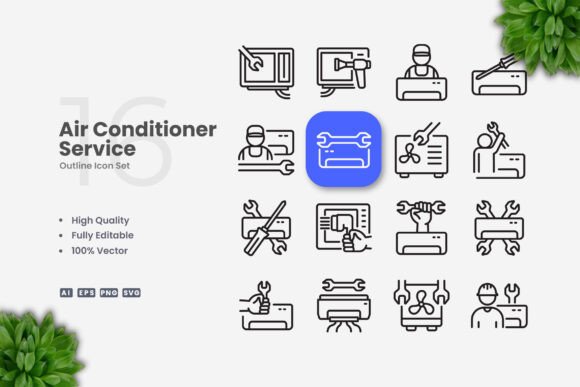
At their core, these icons are 100 percent vector graphics. That means no pixelation when you scale them up for a banner or shrink them down for a mobile button. The set comes with source files in AI, EPS 10, SVG, and PNG with transparency, so you’re covered whether you’re designing in Adobe Illustrator, CorelDRAW, or even a web-based tool that accepts SVG. The stroke weight is editable, the colors are fully customizable, and the design leans toward simple, clean lines — no unnecessary embellishments. This isn’t a pack of ultra-realistic illustrations; it’s a focused collection of symbols that communicate HVAC service concepts at a glance.
Why does simplicity matter? Because in practice, you often need icons that work at small sizes without losing legibility. A complicated graphic turns into a blur on a mobile screen. These icons keep the essential shapes — an air conditioning unit, a wrench, a thermometer, a service van — and strip away the noise. That makes them immediately useful for anyone who needs to show “service,” “repair,” “installation,” or “maintenance” without words.
On a Business Website or Booking App
If you run an HVAC company or a home services platform, your website needs to guide visitors quickly. An icon of a snowflake next to “Cooling Repair” and a flame next to “Heating Service” helps people find what they need without reading paragraphs. The same icons can appear on a booking app’s service selection screen. Because the stroke is editable, you can match the line weight to your brand’s visual style — thin for a modern, minimalist site, thicker for a more playful, approachable look. Freelancers building sites for clients can drop the SVG directly into a Figma or Sketch project and adjust colors to match the client’s palette in seconds.
In Infographics and How-To Guides
Educators and bloggers who explain AC maintenance tips (like changing filters or checking refrigerant levels) often rely on step-by-step visuals. Icons make those steps faster to scan. Instead of photographing every part, you can place a wrench icon next to “Step 1: Turn Off Power,” a filter icon next to “Step 2: Remove Filter,” and so on. The vector format means you can enlarge the icons without losing quality — essential when someone prints your infographic for a workshop or posts it on Pinterest. Bloggers targeting DIY homeowners can use the icons to break down complex topics into digestible pieces, keeping readers engaged without overwhelming them with photos.
On Social Media and Digital Ads
Marketers running seasonal campaigns — “Beat the Heat: Schedule Your AC Tune-Up” — need visuals that stop the scroll. A generic photo of an air conditioner blends into the feed. A crisp, recognizable icon of a technician with a tool, paired with bold text, stands out. Because the icons come in PNG with transparency, you can layer them over brand-colored backgrounds or photos. Entrepreneurs managing their own social accounts can drag and drop the PNGs into Canva or similar tools without needing advanced skills. And since the stroke weight is editable, you can adjust the icons to look either outlined or filled, giving you two styles from one asset.
In Printed Flyers, Posters, and Banners
Small business owners distributing flyers door-to-door or posting in local community boards need designs that print cleanly. Raster images can become fuzzy or lose detail in print, especially on flyers printed at home or at a quick copy shop. Vector icons avoid that problem entirely. Whether you’re creating a half-page flyer for a spring service special or a larger poster for a trade show booth, the icons scale to any size. The editable color allows you to use a single-color scheme for cost-effective printing (like black and one accent color) without losing the graphic’s clarity. The preview mockup is not included, but the actual icon files are ready to place into your layout — just open the AI or EPS file, pick the icons you need, and paste them into your design program.
In Educational Content and Training Materials
Instructors teaching HVAC courses often prepare slide decks, handouts, or digital modules. Icons can replace text labels on diagrams, making them more universal for multilingual classrooms. A simple icon of an air filter, a thermostat, or a compressor helps students quickly identify components during lessons. Because the icons are simple and clean, they work well on projectors and in printed study guides. Freelancers creating curriculum materials for trade schools can rely on the editable stroke to keep the icons consistent with the rest of the document’s line art.
Who Benefits Most
This icon set isn’t just for HVAC professionals. It’s for anyone who needs to communicate service-related concepts visually. Entrepreneurs launching a home maintenance app can use the icons for user interface elements. Hobbyists building a personal website about energy efficiency can illustrate their articles without hiring a designer. Publishers creating an ebook on seasonal home upkeep can drop icons into the layout for a polished, professional finish. Freelancers juggling multiple clients will appreciate the efficiency: one purchase gives you files that work across different projects and software.
The variety of included formats also matters. If you hand off an AI file to a print shop, they can make adjustments. If you upload an SVG to a web development team, they can style it with CSS. The PNGs with transparency are a fallback for quick use in presentations or documents where vector editing isn’t an option. The readme.txt file helps anyone who isn’t sure how to open the files — a small but practical touch.
What to Consider Before Using Them
First, understand that you’ll need vector editing software like Adobe Illustrator or CorelDRAW to fully customize the icons — changing colors, stroke weight, or resizing without quality loss. If you only have access to basic image editors, the PNG files still work, but you’ll be limited to the default colors and sizes. If you plan to recolor frequently, the vector source files are essential.
Second, the preview mockup in the product listing is not included. That means you see what the icons look like arranged in a scene, but those mockup backgrounds, frames, or text overlays are for display only. You receive the actual icon files, not the composition used in the preview. This is standard for icon packs, but worth noting so you don’t expect a ready-made flyer template.
Third, consider your audience. These icons are designed with a clean, modern aesthetic that fits most professional contexts. But if your brand uses a highly decorative or vintage style, the simplicity of these icons might clash. In that case, you could still use them for internal documents or user interfaces where clarity matters more than decorative flair.
Connecting Features to Real Outcomes
The “100 Vector” and “100 Customizable” claims translate to freedom. Instead of hunting for icons that almost fit, you can adapt these to your exact needs. The editable stroke lets you match the thickness of other UI elements so the icon doesn’t look out of place. The “Easy Drag and Drop” is not just a tagline — the PNG files are ready to insert into documents, slides, or mockups, and the SVG files can be dragged straight into code editors or web design tools.
When you see “High Quality Design,” it means each icon was drawn with consistent proportions and alignment. That consistency adds up when you use multiple icons together — they feel like a unified set, not a random collection. For a mobile app, that uniformity improves user experience. For a brochure, it elevates the professional look. For a social media post, it makes your content feel crafted rather than cobbled together.
In the end, Air Conditioner Service Icons are a resource for saving time and improving clarity. Whether you’re a one-person shop designing your own materials or a designer managing multiple brand assets, these icons remove the friction of starting from scratch. They work across print, digital, and educational contexts, and they give you control over the final look without requiring a massive time investment. That’s the kind of practical tool that fits naturally into real workflows — not a glossy asset that sits unused on a hard drive.