Brand Strategy PowerPoint Template: Build a Professional Presentation Workflow
Presenting a brand strategy to stakeholders, clients, or your internal team requires more than just good ideas. It demands clarity, visual structure, and a narrative that lands with impact. A Brand Strategy PowerPoint Template bridges the gap between your strategic thinking and the polished presentation your audience expects. Instead of starting from a blank slide deck, you begin with a framework designed to organize complex information into digestible visuals.
This article walks through what this template offers, where it fits into a real workflow, and how to integrate it into your own process for consistent, professional results. Whether you are a marketer presenting a brand refresh, a founder pitching your identity, or a consultant delivering a strategy report, understanding how to use the template effectively saves time and elevates your output.
What the Brand Strategy PowerPoint Template Contains
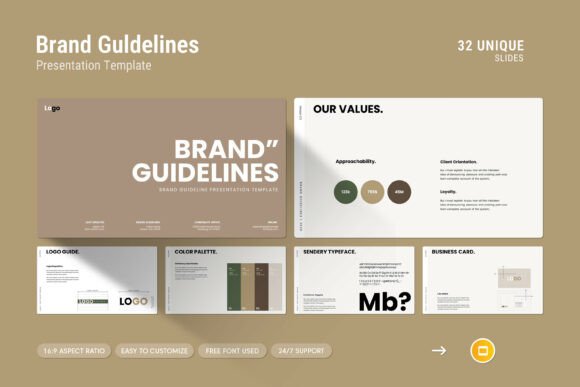
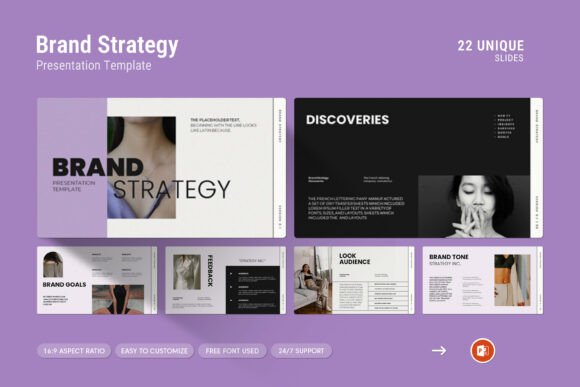
This template is a complete PowerPoint package delivered as a .PPTX file with 22 slides, all set to a 16:9 Full HD ratio (1920x1080px). It is designed for both Apple and Windows environments, so compatibility is not a concern regardless of your operating system. The design language is contemporary and clean, avoiding visual clutter while offering a range of content formats.
Included elements support a structured presentation:
- Creative photo layouts for hero slides and brand imagery
- Infographics to visualize data and strategic flows
- Tables for comparison, timelines, and resource planning
- Vector icons for quick visual cues without custom illustration
- Diagrams such as process flows, Venn diagrams, and hierarchy charts
- Master slide layouts for consistent formatting across all slides
Each element is fully editable. You can change colors, swap images via drag and drop, adjust text, and reposition assets without breaking the design. The template uses a free font, detailed in the included help file, so there is no licensing barrier.
Where This Template Fits in a Workflow
A brand strategy presentation is rarely a standalone task. It typically sits within a larger process involving research, planning, design, and approval. The template supports you before, during, and after the core presentation effort.
Before the Presentation: Preparation and Structuring
When you begin a brand strategy project, you likely have raw materials: competitor analysis, audience personas, brand attributes, messaging pillars, and visual direction. The challenge is organizing this into a logical narrative. The template provides a pre-built structure that prompts you to think about what goes where. Instead of deciding layout from scratch, you map your content onto existing slide types.
For example, the infographic slides can house your brand positioning model. The table slides work well for comparing competitor attributes. The vector icons become visual shorthand for core values. This pre-work stage is where you decide which slides to use, which to omit, and how to sequence them for maximum clarity.
Preparation also includes reviewing the help file included with the template. It covers color change instructions, font details, and general editing guidance. Spending ten minutes here prevents mid-presentation formatting issues.
During the Presentation: Delivery and Engagement
When you present, the template's clean design works in your favor. Minimalist backgrounds, consistent typography, and purposeful visuals keep the audience focused on your message rather than distracting slide transitions or mismatched graphics. The vector icons and diagrams help explain abstract concepts quickly, reducing the need for lengthy verbal explanations.
If you present live, the master slides ensure that any last-minute edits do not break the visual consistency. You can reorder slides, duplicate layouts, or add new content while maintaining the overall look. If you share the deck as a PDF or send it ahead of a meeting, the professional finish reinforces your credibility.
After the Presentation: Handoff and Reuse
Once the presentation is delivered, the template continues to be useful. The .PPTX file can be adapted for future brand strategy updates, internal training sessions, or client proposal decks. Because it is fully editable, you can strip out the old content and insert new material without rebuilding the design. Over time, you build a library of branded presentations that share a consistent visual language.
This reusability is especially valuable for agencies, consultants, and in-house marketing teams who present brand strategies repeatedly. Instead of reinventing the slide deck each time, you refine and iterate on an established framework.
Integration with Other Tools and Resources
The template does not exist in isolation. It complements other tools and methods you already use:
- Brand guidelines – Use your existing color palette and fonts to customize the template's color change feature. This ensures every slide aligns with your brand identity.
- Design tools – If you create custom icons or imagery in tools like Illustrator or Figma, you can import them into the template. The drag-and-drop image replacement makes this straightforward.
- Project management platforms – Use the template as a deliverable template within tools like Notion, Asana, or Trello. Team members can collaborate on content before it enters the deck.
- Research documents – Pull key data points from your brand audit, surveys, or analytics into the infographic and table slides. This grounds your strategy in evidence.
- Internal review processes – Share the editable file with stakeholders for feedback. Because the design is locked via master slides, reviewers focus on content rather than accidental layout changes.
The template also works well alongside presentation delivery platforms like PowerPoint Live, Google Slides (after conversion), or screen recording tools for asynchronous viewing.
Practical Implementation Tips
To get the most out of this template, approach it with intentionality rather than just filling slides. Here are workflow-based observations from real use.
Start with the Master Slides
Before you insert any content, open the master slide view. This is where you set global fonts, colors, and recurring elements like logos or page numbers. Changing these at the master level applies to all slides automatically, saving you from editing each one individually. This single step enforces consistency across the entire deck.
Map Your Narrative Before You Design
Write out the key points of your brand strategy in order. Then match each point to a slide type. For example:
- Opening – Photo layout slide with your brand vision statement
- Context – Infographic showing market landscape
- Audience – Table or icon-based persona breakdown
- Positioning – Diagram illustrating your unique space
- Execution – Timeline or process flow
- Close – Clean call-to-action slide
This narrative-first approach prevents you from overloading slides with text. The template's visual formats naturally encourage brevity.
Use Vector Icons Strategically
The included vector icons are not decorative; they function as cognitive shortcuts. Place them next to key concepts to speed up audience recognition. For instance, a lightbulb icon next to "innovation" or a handshake icon next to "partnership." Keep the icon count low per slide to maintain clarity.
Respect the 16:9 Ratio
Since the template is designed for widescreen, plan your content accordingly. Avoid placing critical information in the bottom 10% of the slide if you project on a screen with slight cropping. The full HD resolution gives you plenty of space when used wisely.
Leverage Drag-and-Drop for Images
Use high-quality, relevant imagery. The drag-and-drop feature means you can test different photos quickly. If you present a brand strategy for a client, use their approved imagery or stock photos that reflect their industry. Avoid generic corporate photos that do not add context.
Efficiency and Consistency Over Time
One of the strongest arguments for using a structured template is efficiency. Creating a professional deck from scratch takes hours of layout decisions, alignment adjustments, and formatting fixes. With this template, you invest that time into content refinement instead.
Consistency matters beyond a single presentation. When your team uses the same template for multiple brand strategy decks, clients and stakeholders recognize the format. It becomes part of your brand's communication style. Over time, you develop a rhythm: pull the template, update the master slides, insert content, and review. The workflow becomes repeatable.
Quality control also improves. Because the template has been designed by a skilled designer, the typography, spacing, and color balance are already optimized. You are less likely to introduce visual errors like mismatched fonts, uneven margins, or clashing colors.
Usability Across Platforms
The template works on both Apple and Windows, which is essential for collaborative teams. Whether your colleague uses a Mac or a PC, the .PPTX file opens correctly. The free font mentioned in the help file should be installed on both systems to avoid substitution issues. Once installed, the template renders as intended.
If you need to share the deck with someone who does not have PowerPoint, you can export to PDF. The 16:9 ratio and high resolution ensure the PDF retains visual fidelity. For remote presentations, consider converting to a video or using a screen sharing tool that supports high-resolution output.
Long-Term Value and Support
A template is only as valuable as the support behind it. This package includes a help file with detailed instructions, and the provider offers free real support from a skilled designer. If you encounter issues with editing, color changes, or image replacement, you can reach out directly. This is a practical safety net, especially if you are on a tight deadline.
Over the long term, the template becomes a reference point. As your brand strategy evolves, you return to the same visual framework. New team members can pick it up quickly because the structure is clear and the editing process is documented. The initial purchase becomes an investment in future efficiency.
Final Observations on Integration
The Brand Strategy PowerPoint Template is not a magic solution that writes your strategy for you. It is a tool that amplifies your existing work. When you have done the research, defined the positioning, and crafted the messaging, the template gives you a professional container to present it.
Integrate it into your workflow by treating it as a bridge between thinking and communicating. Use the preparation phase to align your content with the available slide formats. Use the delivery phase to let the clean design support your narrative. Use the post-presentation phase to archive and reuse the deck for future projects.
The best presentations feel effortless to the audience. That effortlessness comes from preparation, structure, and good design. This template provides the structure and design. Your job is to bring the strategy and the story. Combined, they create a presentation that informs, persuades, and leaves a lasting impression.