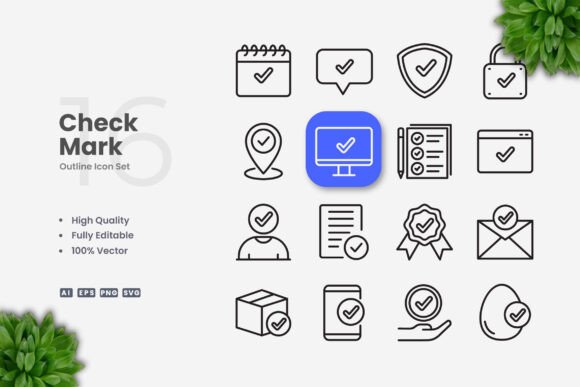
Check Mark Icons for Modern Design Projects
Icons are among the most frequently used visual elements in digital and print design, and few symbols carry the immediate clarity of a check mark. It signals completion, agreement, correctness, or success in a single glance. For designers, marketers, and content creators who need a reliable set of these symbols, a well-built collection of check mark icons can save hours of production time and ensure visual consistency across projects. This article evaluates one such resource: Check Mark Icons, a vector-based icon set designed for flexibility and ease of use across a wide range of applications. Rather than offering generic praise, the goal here is to examine what this set actually provides, who it serves best, and where it fits into practical workflows.
What Check Mark Icons Offers
Check Mark Icons is a collection of one hundred vector check mark symbols, each delivered in multiple file formats. The set is built around simplicity and clean design, with no extraneous decoration that might compete with the symbol's core meaning. Every icon is provided as an editable vector, meaning you can resize, recolor, and adjust stroke weights without degrading image quality. This kind of flexibility is essential when working across different media, from a small mobile button to a large poster.
The included file formats cover the most common vector and raster needs: Adobe Illustrator source files (Ai), EPS version 10, SVG files, and PNG files with transparency. A readme.txt file is also included, which is a small but welcome addition for anyone who wants quick instructions on organizing or using the assets. The preview mockup shown in product listings is not part of the download, so it is important to understand that what you receive is the icon set itself, not the staged presentation.
Clean and Simple Visual Language
The defining characteristic of this set is its straightforward, minimal aesthetic. Each check mark icon is designed without unnecessary flourishes, shadows, or gradients. This makes the set appropriate for professional contexts where clarity matters more than ornamentation. The clean lines ensure that the icon remains legible at small sizes, which is critical for user interfaces, app buttons, and notification badges. At the same time, the icons scale cleanly to larger formats, retaining their crisp edges and balanced proportions on banners or posters.
Full Customizability
Because every icon is a vector, you are not locked into a fixed color, size, or stroke weight. If your brand uses a specific green for success messages, you can change the fill or stroke in seconds using Illustrator or CorelDRAW. If you need a heavier line for a bold header or a thinner line for a subtle confirmation icon, that adjustment is straightforward. This level of editability reduces the need to commission custom icons for every variation of a project, which saves both time and budget.
Consistent File Structure
The inclusion of Ai, EPS 10, SVG, and PNG formats means you can work across different software environments without compatibility issues. SVG files are particularly useful for web and app development because they can be embedded directly into HTML or imported into frameworks like React or Vue. The PNG versions with transparency are ready for quick placement in presentations, documents, or mockups when vector software is not available. This multi-format approach increases the practical value of the set, especially for teams that use a mix of design tools.
Digital Interfaces and Mobile Apps
Check marks appear frequently in forms, to-do lists, settings menus, onboarding screens, and confirmation dialogs. In these contexts, the icon must be instantly recognizable and function well at small pixel dimensions. The clean design of Check Mark Icons meets that need. You can import the SVG directly into a design tool like Figma, Sketch, or Adobe XD, adjust the color to match your interface, and export the asset at the required resolution. There is no need to trace or rebuild the icon from scratch.
Print and Marketing Materials
For flyers, brochures, posters, and banners, check marks are often used to indicate features, benefits, guarantees, or checklist items. The vector format ensures that the icon prints sharply at any size, from a small bullet point to a large graphic element. The ability to change stroke weight is particularly useful in print, where a heavier line may be needed to maintain visibility on coated paper or at a distance. I have found that having a set with multiple weight options, or the ability to adjust weight yourself, prevents the icon from looking lost in a layout.
Infographics and Data Presentation
Infographics rely on icons to convey information quickly. A check mark can denote positive outcomes, completed steps, verified data points, or approved recommendations. Because the icons in this set are uniform in style, you can use them consistently throughout a visual narrative without creating visual noise. This consistency strengthens the overall readability of the infographic, which is important when the audience is scanning for key takeaways.
Social Media and Web Graphics
Social media posts often use check marks to highlight tips, successes, or call-to-action elements. The PNG transparency files allow for quick placement in tools like Canva or Photoshop without the need to open a vector editor. For those who prefer to keep their workflow in Adobe or Corel, the Ai and EPS files give full control over the final appearance. This dual approach makes the set suitable for both rapid content creation and more polished graphic design work.
Freelance Designers and Creative Professionals
Freelancers who handle diverse projects will find value in having a reliable set of check mark icons that can be adapted to different client brands and formats. Instead of searching for a new icon each time, you pull from a consistent library, apply the needed adjustments, and move on. This efficiency matters when you are billing by the project or working under tight deadlines.
Small Business Owners and Entrepreneurs
Business owners who manage their own marketing materials often lack dedicated design support. A clean, customizable icon set allows them to produce professional-looking documents, presentations, and social media graphics without needing advanced illustration skills. The simple drag-and-drop nature of the files reduces the learning curve, and the included formats work with commonly available software.
Marketers and Content Creators
Marketers need to communicate value propositions quickly. Check marks are a natural fit for comparison tables, feature lists, and success metrics. Having a set with a professional, neutral design means the icon does not compete with the message. It supports the content rather than distracting from it, which is exactly what effective visual communication requires.
Educators and Publishers
Workbooks, quizzes, checklists, and instructional materials often incorporate check marks to indicate correct answers or completed steps. The clean line style works well in black-and-white printing, which is important for budget-conscious educational projects. The ability to adjust stroke weight also helps ensure the icon maintains visibility when printed at small sizes on standard paper.
Practical Observations and Recommendations
Having worked with similar icon sets in production environments, I can offer a few observations about how to get the most out of Check Mark Icons. First, take full advantage of the vector editability. Even if you only plan to use the default design, open one of the Ai or EPS files and verify that the stroke weight and color match your project specifications. This small step prevents inconsistencies later.
Second, consider creating a few color variants upfront. For example, you might save a green version for "success," a gray version for "inactive," and a white version for dark backgrounds. By preparing these variants at the start, you avoid repeated adjustments and can drop the icon directly into mockups or live designs.
Third, use the SVG files for web projects instead of converting PNG images. SVG files are smaller, scale perfectly, and can be styled with CSS. This improves site performance and gives developers more control over the final appearance. The inclusion of SVG in this set is a real strength for anyone working on modern web or app projects.
One area to be aware of is the scope of the set. It includes one hundred check mark icons, which is a generous number for a single symbol type. However, the variation is primarily in style, orientation, and stroke treatment rather than in additional conceptual designs. If you need highly specialized check marks, such as those combined with other icons or placed inside complex shapes, you may need to compose those elements yourself. The icons provided are clean, standalone symbols, and they work best when used as straightforward graphical elements.
The absence of the preview mockup in the download is worth noting. Some buyers expect the staged presentation they see in the product listing. That mockup is for demonstration only. What you receive are the icon files themselves, which is standard practice for vector asset sales, but it is important to set expectations accordingly.
Quality, Reliability, and Long-Term Value
The quality of the vectors appears consistent across the set. The curves are smooth, the intersections are clean, and the overall geometry is well-balanced. For a set of one hundred icons, maintaining that level of quality throughout is not trivial, and it speaks to the attention given to the design. The use of editable strokes rather than outlines also adds value because you can continue to refine the icons as your needs evolve.
Reliability in this context means the files open correctly in standard design software, the layers and groups are organized logically, and the colors are applied in a way that makes changes simple. From what I have seen, the set meets these expectations. The EPS 10 format is particularly useful for backward compatibility with older versions of Illustrator or CorelDRAW, and the SVG files are clean enough to be edited in a text editor if needed.
Long-term value depends on how often you need check mark icons. If your work regularly involves UI design, marketing materials, or content creation that uses this symbol, the set will pay for itself relatively quickly in time saved. If you need a check mark icon only once or twice a year, a free single vector might suffice. For those in between, the combination of quantity, quality, and customization makes this a practical addition to a design library.
Final Considerations
Check Mark Icons serves a specific but common design need: a clean, customizable, and professionally prepared set of one of the most used symbols in communication. It avoids unnecessary decoration, provides multiple file formats for different workflows, and gives you full control over appearance through vector editing. The set is best suited for designers, marketers, business owners, and content creators who value efficiency, consistency, and visual clarity. It also works well for educators and publishers who need reliable icons for print and digital materials.
If you are evaluating whether this set fits your particular project, consider how often you use check marks, whether your workflow benefits from editable vectors, and whether the clean style aligns with your visual identity. For most professional and commercial applications, the answer is likely yes. The limitations are mainly around the scope of variation and the lack of included mockups, neither of which diminishes the core utility of the icons themselves. In short, this is a solid, practical resource for anyone who needs a dependable check mark icon set ready for immediate use across multiple media.