Evaluating the Business Story Google Slides Template for Professional Presentations
When you need to present your company’s story, the stakes often feel higher than a routine update. Investors, potential clients, or internal stakeholders are not just looking for information; they are looking for clarity, confidence, and a narrative they can get behind. The format you choose for that presentation matters more than many people realize. A clean, professional template like the Business Story Google Slides Template promises to deliver that polished look with minimal effort. But how does it truly measure up against other approaches you might be considering?
This article takes a practical look at what this template offers, where it fits best, and what tradeoffs you should weigh before deciding. The goal is not to sell you on one tool, but to help you make a well-informed choice for your specific presentation needs.
What Makes the Business Story Google Slides Template Distinct
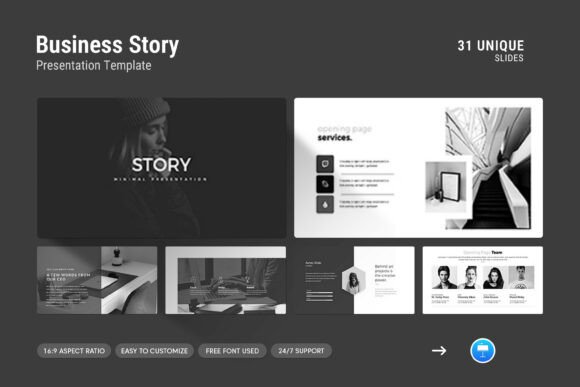
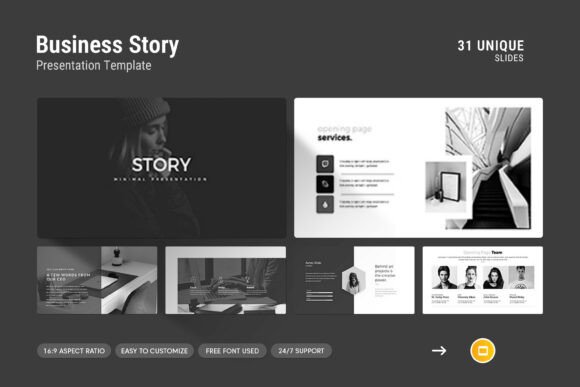
At its core, this template is designed to help you structure a business narrative. It provides thirty-one slides that include photo layouts, infographics, tables, vector icons, and diagrams. The design language is described as simple, contemporary, and powerful. That combination is worth examining because many templates lean either toward minimalism (which can feel sparse) or heavy graphics (which can distract from content).
One of the standout features is the master slide layout. This means you can apply global changes to fonts, colors, and spacing across all slides quickly. For teams or individuals who need to maintain brand consistency without manual tweaking on every slide, this is a significant time-saver. The drag-and-drop picture feature also lowers the technical barrier: if you have images to insert, you do not need advanced design skills to make them look intentional.
The template works on both Apple and Windows operating systems, and it uses a 16:9 Full HD ratio. That resolution is now standard for most screens and projectors, so you avoid the awkward letterboxing that older 4:3 templates can produce. The free font usage means you do not have to purchase additional licensing, which is a practical advantage if you are working with a limited budget or need to share the file with collaborators who may not have the same fonts installed.
Compared to creating a presentation entirely from scratch using blank slides, this template provides a head start. You are not locked into a rigid structure, but you do have a coherent visual framework to build upon. Compared to more complex presentation platforms that require a learning curve or subscription fees, Google Slides offers a familiar, accessible environment. The template file itself is a .PPTX format, which is compatible with both Google Slides and Microsoft PowerPoint, giving you flexibility in where and how you edit.
Strengths That Stand Out in Real Use
When professionals evaluate presentation tools, they often prioritize speed, consistency, and visual impact. The Business Story Google Slides Template addresses all three in a balanced way.
Speed of Setup
Starting with a blank canvas can be paralyzing, especially under a tight deadline. Having thirty-one pre-built slides means you can focus on your message rather than layout decisions. The infographics and diagrams are particularly helpful if you need to present data or processes without spending hours building charts from scratch. For example, a quarterly business review or a pitch deck can be assembled in a fraction of the time compared to designing each slide individually.
Visual Consistency Without Monotony
A common pitfall with templates is that every slide looks identical, leading to a monotonous presentation. This template attempts to avoid that by including a variety of slide types: photo-heavy layouts for storytelling, infographic slides for data, and table slides for comparisons. The result is a presentation that feels cohesive but not repetitive. The vector icons also add a professional touch without cluttering the slides, as long as you use them sparingly.
Easy Customization for Branding
The easy color change feature is more important than it might sound. If your company has specific brand colors, you can adjust the template's palette to match. This ability to adapt quickly means the template does not force its own identity onto your content; it can become a vehicle for your brand. Similarly, the master slides allow you to update headers, footers, or slide numbers across all slides at once, which is essential for polished presentations that look like they were created by a design team.
Tradeoffs and Limitations to Consider
No template is perfect for every situation, and being aware of the tradeoffs helps you decide when this template is right and when you might need something different.
Design Flexibility vs. Constraint
While the template offers many slide options, it still imposes a design framework. If you have a very specific visual identity that is unconventional, or if you need to use complex animations, custom transitions, or highly interactive elements, this template may feel restrictive. The drag-and-drop photo feature is convenient, but it works best with images that fit the preset dimensions. If your photos are odd sizes or require heavy cropping, you may spend extra time adjusting them.
Learning Curve for Advanced Customization
Although the template is advertised as easy to edit, some users may find that changing more than just colors and text requires familiarity with master slides and Google Slides’ deeper editing features. If you are not comfortable with those aspects, you might end up with a presentation that looks similar to the original template rather than something fully tailored to your brand. The help file included with the template can mitigate this, but it assumes a certain baseline of technical comfort.
Suitability for Different Presentation Types
This template is clearly geared toward business storytelling, which covers a broad range of use cases like company profiles, product launches, and pitch decks. However, if you are building a highly technical presentation with dense data tables or complex scientific diagrams, the infographic and diagram templates may not offer the level of detail you need. Similarly, if you are creating a very long training deck with dozens of slides, the thirty-one-slide set may feel repetitive after a while, and you might end up adapting the same layouts repeatedly.
When the Business Story Google Slides Template Shines
Understanding the best-fit scenarios helps you align the tool with your actual needs. Here are a few situations where this template is likely an excellent choice:
- Startups and small businesses: If you are pitching to investors or presenting your company story to potential partners, the professional look and narrative structure can help you establish credibility quickly.
- Internal company updates: Quarterly reviews, team meetings, or strategy sessions benefit from clear layouts and data visualization without excessive design time.
- Marketing or sales presentations: When you need to showcase a product or service with images and infographics, the photo layouts and icon sets help tell the story visually.
- Non-designers presenting: If you or your team lack graphic design skills, this template provides a reliable framework that reduces the risk of amateur-looking slides.
Practical Example: A Company Profile Deck
Imagine you are preparing a company profile to send to a prospective client. With this template, you could use a photo layout slide for your team introduction, an infographic slide for your growth metrics, a table slide for your service offerings, and a diagram slide for your process flow. The consistent design language across these slides makes the deck feel cohesive, while the variety keeps the reader engaged. You can complete the deck in an afternoon rather than a week.
When You Might Consider an Alternative Approach
As helpful as this template is, there are situations where other options may serve you better. Recognizing these scenarios is part of making a thoughtful decision.
Highly Custom Brand Identities
If your brand uses a very specific layout structure, unusual color combinations, or requires custom fonts beyond what the template supports, you may find the customization process frustrating. In that case, a fully custom presentation built from scratch or a more flexible design tool like Canva or Adobe Express could give you the freedom you need.
Interactive or Multimedia-Rich Presentations
If your presentation relies heavily on embedded videos, complex animations, or interactive elements, Google Slides itself has limitations. Even a well-designed template cannot overcome the platform's constraints. In such cases, tools like Prezi or PowerPoint with advanced animation features might be more appropriate.
Lengthy or Densely Technical Decks
For presentations that run over fifty slides with heavy data tables, the template's variety may run out. You might need to create custom slides or use a consistent minimalist approach that does not rely on pre-built layouts. A simple, clean template with fewer design elements could be easier to scale across many slides without visual fatigue.
Factors to Help You Decide
Choosing between the Business Story Google Slides Template and another option comes down to a few key questions:
- How much time do you have? If you need a polished presentation quickly, this template saves significant time. If you have more time and need a unique design, custom work might be better.
- How design-savvy is your team? For teams without dedicated designers, the template's drag-and-drop features and master slides provide a safety net. For experienced designers, the template may feel limiting.
- What kind of content are you presenting? Narrative-driven content with images and data fits well. Highly technical or interactive content may outgrow the template's capabilities.
- How important is brand consistency? If you need strict brand adherence, test the template's color and font customization first. If it adapts easily, it is a good match. If not, a custom approach may be necessary.
A Balanced Perspective
The Business Story Google Slides Template occupies a useful middle ground in the presentation template landscape. It is more structured than a blank canvas, yet more flexible than rigid, pre-built corporate templates. It offers professional design elements without requiring a design background, and it supports a narrative flow that many business presentations lack.
However, it is not a universal solution. The best tool for your presentation depends on your content, your audience, your timeline, and your comfort with customization. For many professionals, especially those aiming to deliver a clear, credible business story without weeks of design work, this template is a practical and effective option. For others with very specific or complex needs, alternative approaches may serve them better.
Ultimately, the most important factor is how well the template helps you communicate your message. If the visual structure supports your narrative and makes your information easier to absorb, then the template has done its job. The rest is about your judgment, your content, and your willingness to adapt the template to fit your unique story.