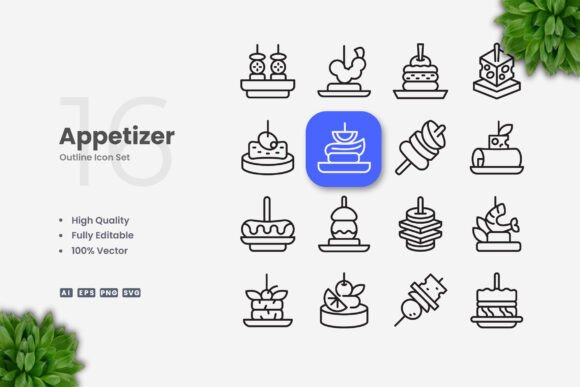
Appetizer Icons: Simple and Clean Graphics for Any Project
Good communication often comes down to clarity. Whether you are designing a mobile app interface, preparing educational materials, or building a brand for a small business, the visuals you choose play a major role in how your message is received. Appetizer Icons offers a set of simple, clean vector graphics designed to fit seamlessly into this wide range of projects. With a focus on versatility and ease of customization, this icon set is structured to save you time while maintaining a high level of quality. Understanding what this set includes and how it works can help you decide if it is the right fit for your next project.
Why the Right Icon Set Matters
Icons are a universal language. They guide users through an interface, break up text in a book, or add visual interest to a presentation. When an icon set is too detailed, it can confuse the viewer at small sizes. When it is too generic, it may fail to communicate the intended message. Appetizer Icons strikes a balance by offering clean, recognizable symbols. This simplicity makes them valuable for both professional designers and those just starting out. Because the files are 100% vector, they maintain crisp edges whether you view them on a phone screen or a printed banner.
Different people will prioritize different aspects of this set. A marketer might value the speed of having ready-to-use PNG files. A graphic designer might care more about the editable stroke weights in the AI files. A small business owner might simply want a consistent look across their website and flyers. By breaking down what the set offers, you can see exactly how it aligns with your own goals.
Getting Started: Ease of Use for Beginners and Hobbyists
If you are new to design, diving into vector software can feel overwhelming. Appetizer Icons is structured to help you ease into the process. The inclusion of PNG Transparency files means you do not need any special software to start using the icons immediately. You can drag and drop them into a blog post, a social media graphic, or a simple flyer created in a tool like Canva or Microsoft Word.
Learning as You Go
As you become more curious about customizing your visuals, the vector files become a hands-on learning tool. Opening an SVG file in a web browser or an AI file in Adobe Illustrator lets you see exactly how the icon is constructed. For example, if you want to change an appetizer icon from black to a specific green to match your brand, you can select the vector path and pick a new color. The Editable Stroke feature allows you to make the lines thicker or thinner. For a hobbyist creating a recipe card, this means you can adjust the icon style to feel more playful or more elegant, depending on your needs.
This learning curve is gentle. You can start by using the PNG files right away, then experiment with the SVG files when you feel ready. The set grows with your skill level, offering long-term usefulness beyond a single project.
Speed and Consistency for Entrepreneurs and Marketers
For small business owners and marketing professionals, time is a limited resource. You often need to produce materials quickly without sacrificing quality. Appetizer Icons supports this workflow in several practical ways.
First, the drag-and-drop nature of the files means you can prototype a flyer or a social media post in minutes. Second, because the icons are part of a cohesive set, your materials will have a consistent visual language. Using the same icon style on your website banner, your email newsletter, and your printed brochure builds recognition and trust with your audience.
Branding on Your Terms
One of the most useful features for entrepreneurs is the ability to batch-edit the icons to match brand guidelines. You can open the EPS file in vector software and change the stroke color to your brand blue. Once you save this customized file, you have a consistent library ready for any future project. This reliability reduces the friction of starting a new design from scratch.
The 100% Vector nature of the files also ensures that your print materials come out looking professional. Whether you are printing small icons on a business card or scaling them up for a trade show poster, the resolution stays perfectly crisp. For an entrepreneur managing their own marketing, this eliminates the worry of pixelated graphics.
Creative Flexibility for Designers and Publishers
Experienced users and creative professionals often need assets that can be reshaped and reused. Appetizer Icons provides a solid foundation for this kind of work. The source files (AI and EPS Version 10) are industry standards, meaning they will work smoothly in your existing workflow.
Adapting Icons for Unique Projects
If you are a UX designer working in Figma or Sketch, the SVG files can be imported directly. Because they are vector paths, you can quickly restructure an icon, combine it with other elements, or use it as a component in your design system. The clean geometry ensures the icons scale beautifully on retina displays.
For print publishers and educators, clarity is paramount. A simple, clean icon for "reading" or "discussion" helps students immediately associate the graphic with the action. You can use the high-resolution PNG files for quick placement in a workbook, or use the EPS files for high-quality printing. The flexibility to resize, change color, or edit stroke weight means you can adapt the same icon for a chapter title page and a small margin note without losing quality.
Collaboration and File Handling
The file structure also supports collaboration. If you work with a team, you can pass the AI files to a colleague for editing. The inclusion of a Readme.txt file provides clear instructions on how the package is organized, reducing confusion. This attention to file management is particularly valuable for freelancers and agencies who juggle multiple projects and need to find the right asset quickly.
Understanding the File Formats
Knowing when to use each file type helps you get the most out of the set. Here is a simple breakdown of what is included and how different users might approach them.
- AI Source File: This is the Adobe Illustrator native file. It retains all editable paths, strokes, and colors. Use this if you have access to Illustrator and want full control over the icon's structure.
- EPS Version 10: This is a widely compatible vector file. It can be opened in older versions of Adobe software, CorelDRAW, and many other vector editing programs. It is a safe choice for professional print workflows.
- SVG File: Scalable Vector Graphics are ideal for web and app design. They are lightweight and scale perfectly on any screen. You can open them in a code editor, a vector tool, or even import them directly into design platforms like Figma.
- PNG Transparency: These are raster images with a transparent background. They are ready to use out of the box in any software that accepts images. Great for quick mockups, presentations, or users who do not have vector editing software.
It is also helpful to note that the preview mockups you see in the product listing are for demonstration purposes only. The files you receive are the clean vector icons themselves. This gives you the freedom to place them into your own layouts and mockups without any restrictions.
Practical Value for Different Readers
This icon set is designed to serve a wide audience, but it may not be the right fit for every single project. Understanding your own priorities will help you decide.
If you are a blogger or content creator: You will likely benefit most from the PNG files for quick use in social media graphics. As you grow, the SVG files offer a way to customize colors for your specific brand palette.
If you are a freelancer or designer: The editable vectors and industry-standard formats (AI, EPS) will likely be your primary tools. The ability to adjust stroke weights and colors makes this set a flexible addition to your resource library.
If you are an educator or publisher: The clarity of the icons and the scalability of the vector formats will support your need for clean, readable materials in both digital and print formats.
If you are a small business owner: The consistency of the set and the speed of implementation can help you maintain a professional brand image without hiring a dedicated design team.
Making the Right Choice for Your Workflow
Appetizer Icons bridges the gap between simplicity and professional customization. It lowers the barrier for beginners by providing ready-to-use formats, while still offering the depth that experienced users need for complex projects. The High Quality Design, combined with the flexibility of vector editing, gives you a resource that can adapt as your skills and project requirements evolve.
When evaluating this set, think about the typical projects you handle. Do you often need to customize the color of your graphics? Do you work across multiple platforms that require different file formats? The inclusion of AI, EPS, SVG, and PNG files ensures that you have the right tool for web, print, and app design. By focusing on clean lines and practical shapes, Appetizer Icons provides a foundation that allows you to communicate your message clearly, regardless of the medium.