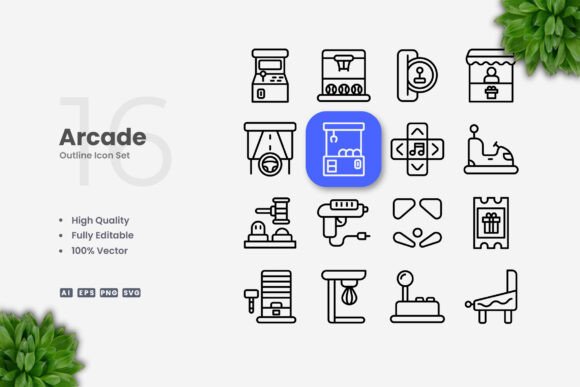
Arcade Icons: Simple and Clean Vector Icons for Every Project
Vector icons have become essential building blocks for modern design. Whether you are building a website, designing a mobile app, creating social media graphics, or producing printed materials, the right icon set can make your work stand out. Arcade Icons offer a collection of high-quality, simple, and clean vector icons that you can adapt to almost any visual project. Their straightforward style avoids unnecessary detail, making them easy to read at small sizes and equally striking when used large. What sets this icon set apart is not just the design itself but how different people—from beginners to seasoned professionals—can put it to work in ways that match their own needs and skill levels.
What Are Arcade Icons?
Arcade Icons is a curated vector icon set with a playful yet minimalist aesthetic. The name hints at a retro gaming vibe, but the icons themselves are modern and versatile. Each icon is built with clean lines, consistent stroke weights, and balanced proportions. The set includes around 100 individual icons—some familiar, some more specific—covering common symbols for actions, objects, and concepts. Because every icon is delivered as a vector file (in AI, EPS, SVG, and PNG formats), you have full control over resizing, recoloring, and stroke adjustments. The simplicity of the design means they work well both as standalone graphics and as parts of a larger layout, and their adaptability makes them suitable for digital and print applications.
Why Different Audiences Value Arcade Icons Differently
The same icon set can serve very different purposes depending on who is using it. A beginner might be drawn to the ease of use and the ready-to-go PNG files, while a professional designer may appreciate the precision of the vector source files and the editable stroke. A small business owner might need icons that communicate clearly on a flyer or social media post, whereas an educator might look for clean visuals that don’t distract from learning content.
Rather than treating all users the same, it is worth exploring how different priorities—such as cost, flexibility, speed, or creative potential—shift the value of Arcade Icons for each person.
For Beginners Just Starting Out
If you are new to design, icon selection can feel overwhelming. You want something that looks professional without requiring deep software skills. Arcade Icons help solve that because you can simply drag and drop the PNG files into any document—be it a presentation, a simple website, or a printed recipe card. The transparency of the PNGs means you don’t need to worry about background removal. Beginners also appreciate that the vector source files are included, so if you ever decide to learn Adobe Illustrator or CorelDRAW, you have real files to practice on. The readme.txt file provides basic instructions, removing guesswork. For someone taking their first steps into visual communication, these icons offer a safe, high-quality starting point.
For Freelancers and Small Business Owners
Time is money, and for freelancers and entrepreneurs, consistency across materials matters. Arcade Icons can be used to unify branding on a website, a promotional poster, and a series of social media posts. Because the set includes a wide enough range of common symbols—like phone, email, download, settings, arrows, and user avatars—you can avoid mixing incompatible icon styles. The editable stroke is a key feature here: you can adjust the stroke weight to match your brand’s line thickness or change the color to fit your palette without redrawing anything. A freelancer creating a client pitch deck can quickly swap icon colors to match the client’s brand, saving hours of custom illustration work. For a small business owner who needs to update a banner every month, being able to recolor the icons in seconds is a practical advantage.
For Professionals and Creators
Experienced designers and creators often have a more critical eye for icon quality. They look for consistency in stroke weight, proportion, and visual balance. Arcade Icons provide that consistency because all icons are designed as a unified set. Professionals also value the ability to edit vector paths, merge icons with custom shapes, or combine them with text for bespoke logos. Since the source files are included in AI and EPS10 formats, you can open them in any vector editor and adjust curves, delete parts, or create entirely new icons by building on existing ones. For example, a creator making an infographic about gaming statistics could use the game controller icon and then slightly modify it to represent different console types. The clean, simple style lends itself to such modifications without looking mismatched.
Creators who produce online courses, ebooks, or blog posts will find that these icons load quickly as SVGs and look sharp on retina displays. The PNG transparency option is also useful for quick mockups where you want to overlay icons on photographs. Having both vector and raster formats gives you flexibility depending on the final output medium.
For Educators and Publishers
Educators often need icons that clearly illustrate concepts without decorative clutter. Arcade Icons’ minimal, clean design works well for worksheets, flashcards, and digital lessons. The stroke icons are legible even at small sizes, which is helpful for diagrams and step-by-step guides. Publishers preparing print materials like brochures or posters can rely on the vector format for scaling up without pixelation. The set also works in black and white, so you can maintain clarity even if you only have a monochrome printer. Since the icons are easy to understand at a glance, they help audiences focus on the content rather than the decoration.
For Hobbyists and Consumers
Hobbyists working on personal projects—like a gaming blog, a party invitation, or a custom planner—can use Arcade Icons to add a polished look without spending much time or money. The set is a one-time purchase (or included in a bundle) with commercial use rights, so you can use it in your own projects without worrying about licensing. If you design a T-shirt or a sticker for fun, the vector files let you scale the icons to any size. Even consumers who just want to personalize a flyer for a community event will find the drag-and-drop PNGs immediate and effective.
Practical Use Cases Across Project Types
Understanding what you can actually do with Arcade Icons helps clarify whether they fit your needs. Here are a few examples:
- Website navigation: Use the icons on buttons or menu items to guide users visually. The SVG format keeps file sizes small, improving page load speed.
- Mobile app interface: Icons at 24–48px remain crisp. Adjust stroke weight slightly thinner for smaller screens if needed.
- Social media graphics: Overlay icons on backgrounds with PNG transparency. Recolor them to match the brand palette for each post.
- Print flyers and posters: Import EPS or AI files into layout software. Scale icons to any size without quality loss.
- Infographics: Combine multiple icons to illustrate data points. The consistent style creates coherence across the graphic.
- Books and ebooks: Use icons as bullet points, chapter markers, or callout visuals. The clean lines work well in both print and digital formats.
- Banners and advertisements: Create bold visuals by using icons as focal points, then adjusting stroke color for contrast.
Editing and Customization Made Simple
One of the biggest selling points of vector icons is how easy they are to customize. With Arcade Icons, you get editable stroke paths. This means you can change the stroke weight from thin to thick, or modify the color directly in your vector software. Beginners may only need to change color, which is as simple as selecting the icon and picking a new swatch. More advanced users can convert strokes to fills, combine icons with custom shapes, or even adjust anchor points to create a variation. The included AI and EPS10 files are compatible with recent versions of Illustrator and CorelDRAW, and SVG files work with free tools like Inkscape or Figma. The flexibility ensures that the icon set can grow with your skills—from simple drag-and-drop all the way to detailed vector editing.
Choosing the Right Icon Set for Your Needs
Not every project demands the same icon style. If you need highly detailed, photorealistic icons, Arcade Icons is not the right choice. But if you value clarity, scalability, and ease of modification, this set stands out. The simple and clean design reduces cognitive load for viewers, which is especially important for user interfaces and educational materials. For marketers creating landing pages, icons that are instantly recognizable at a glance can improve user engagement. For bloggers, consistent icons across posts build visual identity without needing custom illustration every time.
Consider your own priorities: speed vs. originality, cost vs. quality, ease of use vs. deep customization. Arcade Icons leans into speed and ease without sacrificing quality. If you are someone who needs to produce work quickly and maintain a professional look, these icons provide a reliable foundation. If you enjoy tweaking and want to build a unique visual system, the editable vectors give you that runway.
Also note the file types included: AI, EPS10, SVG, and PNG. This variety covers almost any workflow. Web developers can use SVG directly in code; print designers can place EPS in layout software; social media managers can drop PNG into Canva or Photoshop. The readme.txt file offers minimal but helpful guidance. The preview mockup is not included, but that keeps the focus on the icons themselves rather than a styled presentation.
How Arcade Icons Fit Into Your Workflow
Ultimately, the value of any icon set is how well it integrates into your daily work. Whether you are a marketer preparing a campaign, a freelancer delivering assets to clients, a teacher building a lesson, or a hobbyist crafting a personal project, Arcade Icons offer a balance of simplicity and flexibility. The retro-arcade inspiration gives them personality, but the clean execution keeps them adaptable. You can edit and reuse them across many projects without starting from scratch each time. For anyone who needs reliable, customizable vector icons that work everywhere—from mobile apps to large-format prints—this set deserves a spot in your resource library.