Bat Icons: Versatile Vector Icons for Every Project
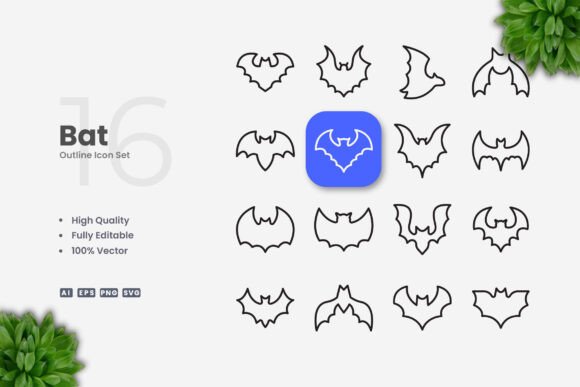
Icons shape the way we communicate visually. A well-designed icon set can transform a plain layout into something memorable, guiding users and reinforcing a theme. Bat Icons delivers exactly that — a collection of simple, clean bat-themed vector graphics built for modern design needs. Whether you are building a website, creating a mobile app, designing a book cover, or putting together social media posts, these icons offer a flexible foundation. They come as editable vector files, meaning you can resize, recolor, or adjust stroke weights without losing quality. The set includes source files in AI, EPS 10, SVG, and PNG formats, plus a Readme.txt for quick reference. Because the icons are 100% vector and fully customizable, they fit into workflows ranging from quick drag-and-drop use to detailed professional editing in software like Adobe Illustrator or CorelDRAW.
What Makes Bat Icons Different for Different Users
No single icon set works for everyone in the same way. What a freelance designer values may differ from what a small business owner needs, and a hobbyist crafter will interact with these files differently than a marketing agency. Understanding those differences helps you decide whether Bat Icons aligns with your own goals, skill level, and project type. Let’s explore how various audiences might use and evaluate this icon set.
Beginners and Hobbyists: Low Learning Curve, High Creative Reward
If you are just starting out with graphic design or you create materials occasionally for personal projects, ease of use is probably your top priority. You do not want to spend hours figuring out layers or anchor points. Bat Icons arrives with an easy drag and drop feature — you can simply place the PNG or SVG file directly into your project without touching the vector source. The PNG transparency also helps when you need a quick image without a background. For hobbyists making Halloween party invites, scrapbook pages, or custom T-shirts, these icons provide a ready-to-use element that looks polished instantly. At the same time, you can open the SVG or AI file in a free vector editor like Inkscape or Vectr and start experimenting with color changes. The editable stroke means you can thicken or thin the lines to match your preferred style, giving you room to grow your skills without feeling overwhelmed.
Professional Creators and Agencies: Precision, Consistency, and Scalability
For graphic designers, web developers, and creative agencies, flexibility and file compatibility matter most. Bat Icons offers high-quality design with a simple, clean aesthetic that works across many contexts: websites, mobile apps, infographics, banners, posters, and even print materials. The 100% vector nature ensures that scaling an icon from 16×16 pixels for a favicon to 2000×2000 pixels for a billboard does not introduce blurriness or pixelation. Professionals often need to maintain brand consistency; being able to adjust stroke weight across the whole set ensures all icons feel cohesive. The included source files (AI and EPS version 10) allow advanced edits like merging shapes, creating custom glyphs, or exporting alternative versions. Because the set is built on simple icon design principles, it integrates well with app interfaces where clarity and readability are essential. You can also use the SVG files directly in code for web projects, keeping vector sharpness at any resolution.
Marketers, Bloggers, and Social Media Managers: Speed and Visual Impact
Time is often scarce in content creation. When you need to publish a post, update a flyer, or design a banner for a campaign, you want graphics that work fast. Bat Icons comes with ready-to-use PNG files with transparency, so you can drop them into Canva, Photoshop, or even a simple document editor without any extra steps. The clean and simple design ensures icons remain legible even at small sizes on mobile screens. For marketers promoting seasonal content (Halloween, night events, or nature themes), the bat motif adds a playful or mysterious touch that stands out. The icons can also be resized and recolored directly in many tools, but if you want more control, opening the EPS or AI file in Illustrator lets you tweak every detail. The result is a professional look with minimal effort, which is especially useful when working under tight deadlines.
Educators, Trainers, and Publishers: Versatility for Learning Materials
Teachers, instructional designers, and publishers often need visuals that serve both informational and decorative purposes. Bat Icons fits into infographics, educational games, worksheets, and book illustrations. The ability to edit stroke weight is valuable here: making lines thicker can improve visibility for young learners. Recoloring allows you to match a school color scheme or differentiate concepts. Since the icons are simple, they do not distract from the main content but rather support comprehension. Educators can also encourage students to practice vector editing skills using the AI or SVG files. Because the set is affordable and includes widely supported formats like PNG and SVG, it works across different platforms, from printed handouts to digital slide decks. The commercial usefulness extends to self-published authors who need consistent chapter icons or cover elements.
Small Business Owners and Entrepreneurs: Reliable Assets for Branding
Starting or running a business involves many visual touchpoints: website, social media, packaging, signage, and promotional materials. Bat Icons provides a cohesive set that can be used across all these channels. Because the icons are customizable, you can adapt them to your brand colors and avoid looking generic. The editable stroke helps you maintain visual consistency whether the icon appears on a large poster or a small mobile button. The files included (AI, EPS, SVG, PNG) ensure you have both editable originals and ready-to-use copies. Small business owners may not have a full design background, but the drag-and-drop usability and clear Readme.txt make it accessible. Over time, as your brand evolves, you can revisit the source files and update the icons without starting from scratch. This long-term usefulness gives Bat Icons a strong commercial value.
Practical Examples of Bat Icons in Action
Seeing how an icon set is actually used helps you judge its fit. Here are a few scenarios that highlight different priorities.
- Website navigation: A freelance developer designs a dark-theme gaming site and uses Bat Icons for menu items. The simple bat silhouette scales cleanly on retina displays, and the editable stroke allows matching the site’s line thickness. PNG fallbacks are ready for older browsers.
- Mobile app icon: An indie app creator needs a tiny icon for a flashlight utility. Opening the SVG in Figma, they adjust the stroke to 1.5px and change the fill to match the app’s accent color. The icon remains sharp at 24×24 dp.
- Social media campaign: A marketer designing a Halloween Instagram post drags the bat PNG into a template. The transparent background lets the icon sit over a gradient. In two minutes, the post is ready for scheduling.
- Educational infographic: A teacher preparing a science lesson on nocturnal animals uses Bat Icons along with other diagrams. They import the AI file into Canva, recolor the bats to brown, and add labels. The simple lines help students focus on the concept.
- Print flyer: A small business owner promotes a themed restaurant night. They open the EPS file in CorelDRAW, enlarge the icon significantly, and change the stroke to a thicker 4pt for visibility on paper. The vector format ensures crisp print quality.
Evaluating Bat Icons Against Your Priorities
When deciding whether this set matches your needs, consider your main objective. If you value ease of use and you are a beginner, the drag-and-drop PNG files and simple SVG make the set approachable. If flexibility matters most, the full vector source files and editable stroke give you professional control. For those concerned with cost, Bat Icons offers a large value considering the number of formats and the customization freedom. Quality stems from the clean, simple design language that remains legible across sizes, and the high-quality vector ensures no degradation. For speed, the pre-exported PNG transparency saves time. For commercial value, the ability to use the icons across multiple projects and adapt them to branding extends their usefulness beyond a single use.
Sometimes the same feature matters for very different reasons. A small business owner might appreciate the commercial license and file variety, while a hobbyist values how easily they can edit the stroke without needing advanced skills. A professional designer sees the set as a reliable building block for complex layouts, while a blogger uses it to quickly add visual interest without opening heavy software. This range of applications makes Bat Icons suitable for anyone who needs simple, elegant bat-themed graphics.
What the File Package Includes
Knowing exactly what you get helps set expectations. The package contains:
- Source File Ai – editable Adobe Illustrator file with all vectors separated by layer
- EPS Version 10 – compatible with CorelDRAW and other vector software
- SVG File – scalable vector graphic for web use and code integration
- PNG Transparency – ready-to-use images without background
- Readme.txt – brief instructions and file overview
Note that preview mockups are not included, so what you receive are the icons themselves, ready to be used in your own designs. This keeps the focus on the vector elements and their versatility.
Making the Right Choice for Your Project
Bat Icons fits comfortably into many workflows because it prioritizes simplicity and customization. Whether you need a single icon for a social media post or a full set for a brand identity, the files adapt to your skill level and tools. If you are experienced with vector software, you can push the customization further. If you prefer a straightforward design, the default look is already clean and contemporary. The key is to match your own needs with the set’s strengths: ease of editing, multiple formats, and a consistent visual style. By understanding how different users approach this icon set, you can better decide if it will serve your purposes effectively.