Car Icons: Evaluating Vector Icon Sets for Versatile Design Use
When assembling visual assets for websites, mobile apps, or printed materials, the choice of iconography plays a foundational role in communication and user experience. Icon sets simplify complex ideas, improve navigation, and add visual interest without overwhelming content. Among the many options available, Car Icons represent a focused category of vector-based imagery designed to represent vehicles, transportation, and related concepts. For design professionals and hobbyists alike, understanding how such icon sets function, what they offer, and where they fit into a broader workflow is critical for making informed decisions. This evaluation examines Car Icons as a practical resource, exploring their strengths, limitations, and the contexts in which they provide the most value.
What Are Car Icons?
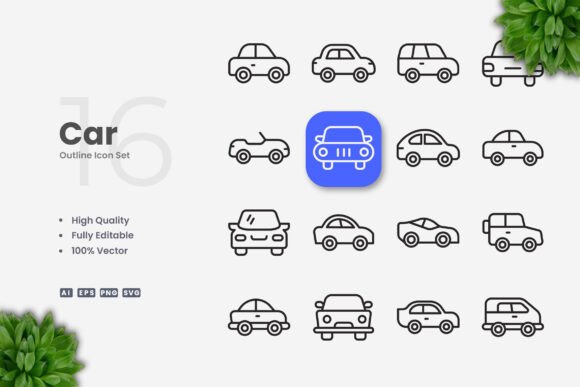
Car Icons refers to a curated collection of vehicle-themed vector graphics created to meet the needs of digital and print designers. Unlike raster images, which are composed of pixels and can become pixelated when resized, vector icons are built from mathematical paths. This allows them to scale infinitely without losing clarity. The set includes icons such as sedans, SUVs, trucks, sports cars, and essential transportation symbols, all rendered in a simple and clean design language. The files are provided in multiple formats, including Adobe Illustrator source files (Ai), EPS version 10, SVG, and PNG with transparency. A Readme.txt file is also included to guide users on file usage. Importantly, the preview mockup is not part of the download, meaning the icons themselves are the central deliverable.
Why Consider Car Icons?
Designers often seek icon sets that balance aesthetic consistency with functional flexibility. Car Icons appeal to several core needs. First, they offer a unified visual style that can integrate into diverse projects without requiring extensive customization from scratch. The simple and clean design makes these icons suitable for both minimalist interfaces and more detailed infographics where clarity is paramount. Second, because every icon is a 100% vector file, users can adapt the size, color, and stroke weight to align with brand guidelines or specific layout requirements. This level of control is particularly valuable for projects that demand precise visual harmony, such as mobile apps with strict design systems or presentations where icon weight must match accompanying text.
Another significant attraction is the ease of use across different platforms. The inclusion of SVG files means web developers can embed icons directly into code without losing quality. Similarly, the PNG files with transparent backgrounds allow for quick placement in design mockups or social media graphics. For print projects, the EPS 10 format ensures compatibility with professional layout software like Adobe InDesign or CorelDRAW. This multi-format approach reduces the friction often encountered when moving between design stages, from concept to final output.
Benefits and Practical Advantages
The primary advantage of Car Icons lies in their adaptability. When you purchase or download a vector icon set, the expectation is that you will be able to tweak it to suit your specific needs without starting from scratch. Car Icons delivers on this promise through several key features:
- High Quality Design: The icons are crafted with attention to proportion and detail, ensuring they remain legible at small sizes—critical for mobile interfaces—while still looking polished when enlarged for posters or banners.
- 100% Vector: Every icon is resolution-independent. This means they work equally well on a smartphone screen, a billboard, or a printed flyer.
- 100% Customizable: Users can change colors, resize elements, or combine icons to create new symbols. This flexibility is essential for brands that need to maintain a specific color palette.
- Editable Stroke: The stroke weight can be adjusted in vector software, allowing designers to match the icon weight to surrounding typography or other UI elements. This is a subtle but powerful feature for achieving visual consistency.
- Easy Drag and Drop: The organized file structure and standard formats simplify importing icons into your project. You can open an SVG or EPS file and drag the icon directly into your design canvas.
- Multiple File Formats: With Ai, EPS 10, SVG, and PNG files included, you have options whether you are working in a vector editing environment, a code editor, or a raster-based application. The Readme.txt file helps you navigate these choices.
These benefits make Car Icons a strong candidate for anyone who needs a reliable set of vehicle icons that can be deployed quickly and refined over time. The editable stroke feature alone sets it apart from icon sets that only offer fixed-weight outlines, as it gives designers the ability to fine-tune the visual impact according to the medium—for example, using a heavier stroke for a printed poster that will be viewed from a distance, and a lighter stroke for a detailed infographic.
Tradeoffs and Considerations
While Car Icons offers substantial value, there are tradeoffs worth evaluating. The most notable limitation is that the preview mockup is not included. For some designers, having a mockup—such as an image of the icons displayed on a smartphone or a billboard—can speed up client presentations or concept pitching. Without it, you will need to create your own mockups or rely on the raw icons. This may require extra effort, particularly if you are presenting to stakeholders who prefer to see icons in context.
Another consideration is the dependence on vector editing software. To fully take advantage of the customizable features—changing colors, editing strokes, or scaling—you need access to programs like Adobe Illustrator or CorelDRAW. If you are working solely with raster-based tools like Photoshop without vector capabilities, you can still use the PNG files, but you lose the ability to edit strokes or scale without quality loss. However, for most professional design workflows, vector software is standard, so this should not be a prohibitive factor.
Design style is also a point of evaluation. The "simple and clean" design language means these icons are deliberately stylized and may not fit every aesthetic. For projects that require highly realistic vehicle illustrations, detailed technical drawings, or a specific artistic style like flat or line art variations, Car Icons might feel too generic. Similarly, if your project demands icons with dimensional shading, gradients, or complex details, this set may not be the right starting point. The simplicity is a strength for many applications but can be a constraint for others.
File format compatibility is generally broad, but it is worth verifying that your software can open EPS version 10 or that your development environment supports SVG. Most modern applications do, but older software may require conversion. The PNG files handle immediate needs well, but transparent PNGs can be large if not optimized for web use. These are minor concerns but worth noting for efficient workflow planning.
Where Car Icons Shines
Given its features, Car Icons is particularly well-suited for several common scenarios:
- Website and Mobile App Interfaces: The clean design and editable stroke make these icons ideal for navigation menus, buttons, and placeholders. They can be resized to fit responsive designs and recolored to match brand themes.
- Infographics and Data Visualization: Simple icons help communicate concepts rapidly. You can use car icons to represent vehicle segments in charts or to illustrate transportation statistics without cluttering the visual.
- Social Media Graphics: With PNG transparency, you can quickly drop icons into posts, stories, or cover images. The scalable nature ensures they look crisp on high-resolution screens.
- Print Materials: Flyers, banners, posters, and brochures benefit from vector icons that print cleanly at any size. The EPS 10 format is widely accepted by printing services.
- Educational and Instructional Content: Books or manuals that explain vehicle features or traffic rules can use these icons to support text without requiring elaborate illustrations.
In these contexts, the combination of simplicity and flexibility serves both functional and aesthetic goals. The icons act as visual shorthand, freeing the reader or user to focus on the content rather than deciphering complex graphics.
When Alternatives May Be Worth Considering
Despite its strengths, Car Icons is not a universal solution. In certain situations, you might benefit from exploring other options:
- When You Need Contextual Mockups: If your purchase decision heavily depends on seeing icons in realistic preview environments, you may want a resource that includes such mockups or create your own. Some icon marketplaces include scene builders or device mockups alongside icon sets, which could save time.
- When You Require a Specific Artistic Style: If your brand uses a distinct illustration approach—such as hand-drawn lines, isometric views, or heavily detailed renderings—a more tailored set might be necessary. Car Icons' simple and clean style may clash with elaborate visual systems.
- When Working in Non-Vector Environments: If your workflow is entirely based on raster graphics and you do not plan to use vector editing software, the value of the vector files is diminished. In that case, a set of high-resolution PNGs with multiple sizes might be more practical, though you will lose some scalability.
- When the Icon Count Is Limited: While Car Icons covers common vehicle types, if your project requires a vast library including obscure models, vintage cars, or specific vehicle parts, you may need to complement this set with additional icons or create custom ones.
Evaluating these alternatives is part of a thorough assessment. The goal is to match the tool to the task, and Car Icons performs best when its simplicity aligns with the project's visual requirements and the designer has access to vector editing capabilities.
Practical Decision-Making Insights
To determine whether Car Icons aligns with your needs, consider the following practical questions:
- What is your primary output medium? For digital-first projects like websites and apps, the SVG and editable Ai files are highly useful. For print, the EPS and PNG formats provide flexibility. If your work spans both, the multi-format package is advantageous.
- How much customization do you anticipate? If you plan to change colors or stroke weights frequently, the vector nature of the set is a critical advantage. If you intend to use icons as-is, the PNG files may suffice, but you will still benefit from the vector source for future adjustments.
- Do you have access to vector editing software? Without Adobe Illustrator, CorelDRAW, or similar programs, you cannot modify the strokes or rescale without quality loss from the EPS files. However, you can still use the SVG and PNG files, which are accessible to a wider range of applications.
- How important is consistency across your project? Using a cohesive icon set like Car Icons ensures that all vehicle icons share the same stroke weight, proportion, and style. This can save significant time compared to sourcing icons from different sets that may not match.
- What is your timeline? If you need icons ready for a quick social media post or flyer, the drag-and-drop nature of the files allows for fast implementation. For more complex uses like app icon sets, the editable strokes enable fine-tuning, which may require more upfront time but yields better results.
By answering these questions, you can gauge whether Car Icons will streamline your workflow or introduce unnecessary steps. For many designers, the scalability and customization options outweigh the absence of predefined mockups. The key is to approach the decision with clear expectations: you are investing in raw material—vector graphics—that you will shape according to your project's demands.
Conclusion
Car Icons delivers a focused, high-quality set of vector transportation graphics suited for a wide range of design applications. Its strength lies in its simplicity, customization potential, and format versatility, making it a practical choice for websites, mobile apps, print materials, and social media. However, it is not a complete package for every scenario; the lack of preview mockups and the need for vector editing software are factors that should be weighed against your specific workflow. For those who value control over stroke weight, color, and scalability, and who work in environments where vector tools are standard, Car Icons offers a solid foundation. When aligned with your project's goals, it serves as a reliable asset that reduces production time while maintaining visual quality. In evaluating options, consider how the set's features mesh with your design process, and make your choice based on the balance between flexibility and the specific demands of your project.