Practical Vector Design with Contact Book Icons for Digital and Print Projects
When building a user interface, designing a mobile app, or preparing materials for print, small visual elements often determine how polished the final result feels. Icons, in particular, carry a lot of weight. They guide users, communicate meaning quickly, and reinforce brand identity. Among the many icon sets available, Contact Book Icons stands out as a focused, functional collection that addresses a common need: representing contact-related actions and information clearly. This article offers a practical evaluation of the set, covering its design qualities, file structure, real-world usability, and the types of professionals who are likely to benefit most from including it in their workflow.
What Contact Book Icons Offers as a Design Resource
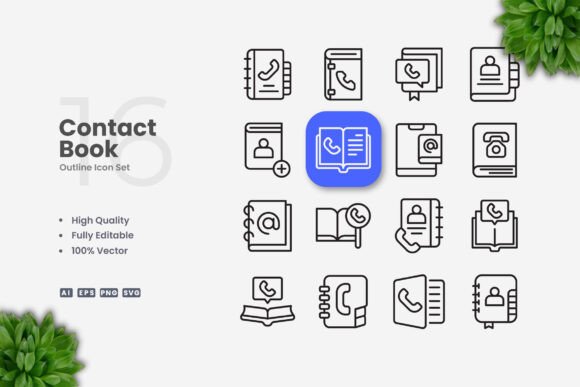
Contact Book Icons is a vector-based icon set centered on contact book themes. It includes 100 individual vector icons, each built with an editable stroke and a clean, minimal aesthetic. The set is provided in multiple formats: Adobe Illustrator source files (Ai), EPS version 10, SVG files, and PNG files with transparency. A readme.txt file is also included for quick reference. The collection is designed for straightforward integration across both digital and print media, including websites, mobile apps, social media graphics, infographics, flyers, banners, posters, and books.
What makes this set worth examining is not just the number of icons, but the deliberate simplicity of the design language. Each icon avoids unnecessary ornamentation. Strokes are uniform, shapes are recognizable, and the overall visual weight remains consistent from one icon to the next. This kind of coherence matters when you are using multiple icons together in a single interface or layout. Inconsistent icon styles create visual noise. Contact Book Icons avoids that problem by maintaining a uniform stroke width and a consistent geometric approach across the entire set.
Strengths in Design Quality and Visual Consistency
From a design perspective, the most important feature of any icon set is consistency. If one icon uses a thick stroke and another uses a thin stroke, or if some icons are filled while others are outlined, the set feels disjointed. Contact Book Icons addresses this with a unified stroke weight across all 100 icons. Every symbol shares the same line thickness, corner radius style, and proportional scale. This makes the set immediately usable in professional contexts where visual harmony is expected.
The clean, minimal approach also improves legibility at small sizes. In digital interfaces, icons often appear at 24px, 32px, or 48px. Complex icon designs with excessive detail become muddy at those dimensions. Contact Book Icons avoids that problem with straightforward shapes that remain readable even when scaled down. For print applications like business cards, flyers, or posters, the same clarity applies. The icons hold their shape well whether printed at a small size in a booklet or enlarged for a banner.
The editable stroke feature adds another layer of practicality. Because the icons are built as vector paths with defined strokes, you can adjust the stroke weight to match a specific design system. If your interface uses slightly thicker or thinner lines than the default, you can modify the entire set in a few steps using vector editing software like Adobe Illustrator or CorelDRAW. Similarly, changing the stroke color to match a brand palette is straightforward. This level of customization is important for professionals who need icons to blend seamlessly into existing designs rather than forcing the design to accommodate the icons.
Usability Across Digital and Print Workflows
Practical usability depends heavily on file format availability. Contact Book Icons includes source files in Ai and EPS version 10, which cover the vast majority of professional vector editing workflows. SVG files are included for web development and digital projects where scalable vector graphics are preferred. PNG files with transparency offer a quick option for presentations, social media posts, or situations where vector editing is not required.
For web developers and UI designers, the SVG files are particularly valuable. SVG icons can be embedded directly into HTML, styled with CSS, and scaled without quality loss. Because contact book icons typically represent actions like add contact, edit, delete, search, call, message, email, and address, they align well with common app and website functions. If you are building a contacts page, a user profile section, a messaging interface, or a directory, this set provides ready-made visual language for those features.
For print designers, the EPS and Ai files allow for precise placement, scaling, and color management. Flyers, posters, and brochures often require icons that can be resized without resolution loss. Vector formats solve that problem. The PNG transparency files also serve as a quick option for inserting icons into presentation slides or documents without opening a vector editor.
One practical consideration worth mentioning is the note in the product details: preview mockups are not included. This is not a limitation for most experienced users, but it is worth being aware of. The purchase covers the icon set itself, not presentation templates. If you expect ready-made mockup scenes, you will need to source those separately. For professionals who already have their own workflow and presentation templates, this is a non-issue.
Who Benefits Most from Contact Book Icons
This icon set is not a generic all-purpose collection. It is specifically focused on contact book themes. That focus makes it most valuable to professionals working on projects where contact management, communication, or directory features are central.
- UI and UX designers building mobile apps or web platforms that include contact lists, messaging, or user profiles will find the icons directly applicable. The set covers the standard actions users expect when interacting with contact data.
- Entrepreneurs and small business owners creating marketing materials, landing pages, or branded collateral can use the icons to visually represent communication channels, team directories, or support sections.
- Freelancers and independent creators who design social media content, infographics, or presentation decks will appreciate the clean aesthetic and easy customization. Changing stroke color to match a brand palette takes minimal effort in vector software.
- Publishers and educators preparing printed materials such as books, manuals, or instructional guides can use the icons as visual aids in sections about communication, networking, or contact management.
- Marketers and content creators designing flyers, posters, or banners for events, conferences, or business services will find the icons useful for conveying contact-related information at a glance.
The set is also suitable for serious hobbyists who maintain personal projects like blogs, portfolios, or community directories. The low learning curve and straightforward file formats make it accessible even if you do not use vector software daily.
Customization and Flexibility in Real-World Use
Customization is one of the key selling points of vector icon sets, and Contact Book Icons delivers on this front. Because the icons are built with editable strokes and grouped paths, you can modify them extensively without redrawing anything. Common adjustments include:
- Changing stroke color to match a brand or interface theme. Select all icons or individual icons and apply a new stroke color.
- Adjusting stroke weight to align with a specific design system. If your interface uses 2px strokes and the icons default to 1.5px, you can update the entire set consistently.
- Resizing without quality loss because vector formats maintain sharp edges at any scale.
- Combining icons with other vector elements to create custom compositions or hybrid symbols.
That said, there is a practical limitation worth noting. If you need to modify the icons significantly—for example, changing a filled shape to an outlined one or altering the core geometry—you will need basic proficiency in vector editing software. While the files are designed to be easy to work with, they are not automated. Users who have never opened Adobe Illustrator or CorelDRAW may face a learning curve. However, for the intended audience of professionals, freelancers, and creators, this is generally not a barrier.
Long-Term Value and Reliability
Vector icon sets offer strong long-term value because they are resolution-independent and format-flexible. As your project evolves, you can reuse the same icons across new platforms, updated interfaces, or different print runs without needing to purchase a new set. Contact Book Icons, being a focused collection rather than a massive icon library, gives you exactly what you need for contact-related contexts without paying for hundreds of unrelated symbols.
The inclusion of SVG files also future-proofs the set for web use. SVG is a widely supported standard, and as web technologies continue to evolve, SVG icons remain compatible. If you switch from one design tool to another, the SVG and EPS formats transfer cleanly between most applications.
Reliability also depends on the quality of the original vector construction. Poorly constructed vectors can cause problems with editing, scaling, or rendering. Contact Book Icons uses standard vector paths with clean node placement, which means fewer unexpected issues when modifying or exporting the files.
Practical Considerations Before Purchasing
Before committing to any icon set, it helps to consider whether the style and scope match your actual project needs. Contact Book Icons uses a simple, clean, outlined style. If your design aesthetic leans toward highly detailed, illustrated, or filled icons, this set may not align with your vision. The minimal style is intentionally restrained, which is a strength for professional communication but may not suit every creative direction.
Additionally, the set is dedicated to contact book themes. If you need icons for unrelated categories like e-commerce, travel, or food, you will need to look elsewhere. Specialization is a trade-off: you get thorough coverage of one category, but you do not get general-purpose variety. For many projects, that focused approach is exactly what you want. It avoids the clutter of irrelevant symbols and ensures every icon has a clear purpose.
Finally, the preview mockup exclusion means you are buying the raw icons, not staged presentations. If you present mockups to clients regularly, you will need to place the icons into your own template layouts. This is standard practice for most experienced designers, but beginners should be aware that the product does not include ready-made scene mockups.
Who May Find It Less Suitable
While Contact Book Icons works well for a wide range of professionals, it may not be the best fit for everyone. Large design teams working across multiple brands with vastly different visual languages may need a more extensive library or a fully customizable icon system. Designers who require icon animation capabilities or variable font-style icons may need to look at specialized icon frameworks instead.
Similarly, if you are building a website entirely with no-code tools that only accept PNG uploads, the PNG files included in the set will work, but you will lose some of the scalability advantages of the vector formats. In that scenario, the set still functions, but the vector flexibility is underutilized.
Final Observations on Contact Book Icons as a Practical Resource
Contact Book Icons delivers exactly what its name suggests: a clean, consistent, and customizable set of vector icons for contact book contexts. The 100 icons cover a useful range of symbols related to contacts, communication, directories, and user actions. The file formats support both digital and print workflows, and the editable stroke feature gives designers control over visual weight and color.
For professionals who regularly build interfaces, marketing materials, or printed content involving contact management, this set saves time and ensures visual consistency. The focused theme and minimal design language make it a straightforward addition to any toolkit. As with any design asset, the value depends on how well it fits your specific project requirements. If your work involves contact-related features, and you value clean, editable vector icons, this collection offers a reliable and practical solution.