Evaluating 3D Printing Icons for Professional Design Projects
When building a website, app, or printed material around 3D printing topics, finding consistent, scalable visuals can be surprisingly difficult. Generic icon sets often miss the technical nuances of additive manufacturing, while custom illustrations take time and budget that many teams simply do not have. 3D Printing Icons offers a dedicated collection of vector graphics aimed at filling this gap. The set includes 100 customizable icons covering common 3D printing concepts, equipment, materials, and processes. Designed for use across digital and print media, this package provides source files in AI, EPS, SVG, and PNG formats, along with editable strokes and full color control. For anyone regularly producing content about 3D printing, this icon set aims to reduce recurring design work and maintain visual consistency.
What the Icon Set Includes and How It Works
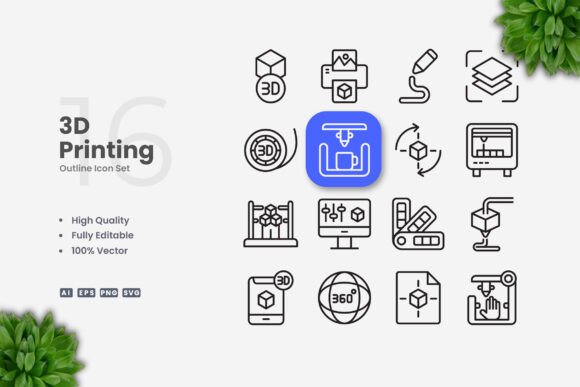
The collection is delivered as a bundle of vector files. You receive an Adobe Illustrator source file (AI), an EPS version 10 file, individual SVG files, PNG files with transparent backgrounds, and a readme text file for basic instructions. The 100 icons cover a broad range of 3D printing subjects, including printers, filaments, nozzles, print beds, calibration tools, finished objects, layer visuals, and workflow stages. Each icon uses a clean, simple line style with editable stroke weights, making it straightforward to adapt the visuals to different layout densities and brand guidelines.
Because the icons are fully vector-based, resizing does not degrade quality. You can scale an icon down to fit a mobile app toolbar or enlarge it for a poster without losing sharpness. The stroke weight remains consistent unless you choose to adjust it manually. This flexibility is especially useful when you need the same icon to appear at multiple sizes across a website, social media graphic, and printed brochure. The PNG versions provide a quick drop-in option for users who do not have vector editing software installed, while the SVG and EPS files allow deeper customization.
Strengths in Real-World Use
One of the more practical strengths of this set is its focus on a single subject area. Many general-purpose icon collections include only one or two 3D printing related symbols, forcing designers to either reuse them excessively or create complementary icons from scratch. With 100 dedicated icons, you have enough variety to represent different machines, materials, and actions without repeating the same visual cues. This matters when you are designing an infographic that explains filament types, for example, because you can assign distinct icons to PLA, ABS, PETG, and flexible materials rather than relying on text labels alone.
The editable stroke feature also holds real value. In many icon sets, the stroke weight is fixed, which limits how well the icons integrate with different interface sizes. When you reduce a fixed-stroke icon for a mobile button, the line may become too thick relative to the surrounding UI elements. With adjustable stroke weight, you can match the icons to your existing design system more precisely. This control extends to color changes as well. Because the icons are vector shapes rather than raster images, you can recolor them instantly to align with brand palettes or to indicate different states in an interactive application.
Another strength worth noting is the inclusion of multiple file formats. Not every team uses Adobe Illustrator. By providing EPS, SVG, and PNG alongside the AI source file, the set accommodates a wider range of workflows. SVG files work well for web developers who want to embed icons directly into HTML or CSS, while EPS files remain a standard choice for print production workflows. The PNG files serve as a convenient fallback for quick mockups or for users who cannot edit vector files at all. This format variety makes the set more accessible to different roles within a project team.
Who Benefits Most from This Icon Collection
For small business owners running a 3D printing service, having a consistent visual language across your website, quotes, and social media posts can make your operation look more polished. Using the same icons on your order form, your Instagram explainer, and your pricing flyer reinforces brand recognition without requiring a graphic designer on retainer. You can open the AI file, select the icons relevant to your services, change colors to match your logo, and export them for each platform within minutes.
Freelance designers and creative agencies working with clients in the additive manufacturing space will find the set useful for reducing project timelines. Instead of budgeting time to design custom icons for a client's website or product launch page, you can pull from this collection and customize as needed. The editable stroke and color flexibility mean the icons can be adapted to different brand identities without starting from zero. For recurring clients who publish regular content about 3D printing, the set provides a consistent visual library that saves time on each new project.
Educators and technical writers who create instructional materials, guides, or presentations about 3D printing can also benefit. Clean, simple icons help readers follow procedural steps or understand component names more quickly than text-heavy slides alone. The PNG transparency option is particularly handy for dropping icons into a Keynote or PowerPoint presentation without needing to remove backgrounds manually. Similarly, bloggers and content creators covering 3D printing news, reviews, or tutorials can use the icons to add visual interest to articles, social media posts, and video thumbnails. Consistent iconography across your content library builds a cohesive look that audiences come to recognize.
Publishers and infographic designers working on reports, books, or marketing collateral about 3D printing will appreciate having a ready-to-use set that covers a broad topic range. When you need to visualize a workflow from design to finished print, having icons for each stage saves hours of illustration work. The ability to edit stroke weight is also valuable here, because infographics often mix small callout icons with larger focal illustrations. Being able to adjust the line thickness ensures visual harmony across different elements on the same page.
Limitations and Practical Considerations
While this icon set covers many common 3D printing subjects, it is not exhaustive. Some niche or rapidly evolving technologies such as metal sintering, bioprinting, or large-format construction printing may not be represented. If your content focuses heavily on industrial or advanced processes, you may need to supplement this set with custom icons for those specific areas. The set is designed around a clean, minimal aesthetic, which works well in modern interfaces and print layouts, but it may not suit brands that prefer highly detailed, illustrative, or three-dimensional icon styles.
Another point to consider is that the icons use a consistent line style, which is a strength for uniformity but also means that all icons share a similar visual weight. If you need icons that vary significantly in complexity or hierarchy, you will need to adjust stroke weights or add secondary elements manually. The editing process itself requires vector software such as Adobe Illustrator or CorelDRAW. Users without access to these programs will be limited to the PNG files, which offer less flexibility for resizing and recoloring without quality loss.
The preview mockup images shown in the product listing are not included in the download. This is standard practice for icon sets, but it is worth noting that the icons themselves are provided as individual files rather than styled presentation layouts. You will need to arrange them within your own design files. The readme text file provides basic file usage instructions, but does not include detailed tutorials or design inspiration. Users who are new to vector editing may need to consult external resources for guidance on changing stroke weights or recoloring shapes.
Quality, Consistency, and Long-Term Value
The visual quality of the icons is consistent across the set. The line weights are uniform, the style remains simple and readable at various sizes, and the subject matter covers the most frequently referenced aspects of 3D printing. For a team that produces content in this niche on a regular basis, the return on investment comes from the time saved on each project. Instead of sourcing or creating new visuals repeatedly, you build a library that you can reuse and adapt over months or years. The vector source files do not degrade over time, and the formats included are widely supported, so the set remains usable as your software and workflows evolve.
Consistency in icon design also contributes to user experience. When visitors see the same icon representing the same concept across your website, app, and printed materials, they develop a mental map of your information architecture. This reduces cognitive load and makes your content easier to navigate. For businesses and educators who communicate complex technical information, this consistency can improve comprehension and retention.
Recommendations for Getting the Most Out of the Set
If you decide this set fits your needs, start by reviewing the full collection in the AI file. Identify which icons align with your most common content topics, then create a subset that matches your brand colors and stroke preferences. Save this customized version as a reusable symbol library so you can drag and drop icons into future projects without repeating the color adjustments. For web use, export the icons as SVG files and consider embedding them directly in your HTML for crisp rendering at any screen resolution. For print, use the EPS files to maintain vector quality through your layout software.
For teams, designate one person to manage the master icon file and handle updates, whether that means adding custom icons later or adjusting the set when your brand guidelines change. Maintaining a single source of truth for the icon library prevents version drift and keeps your visual identity consistent across different projects and team members.
If your work involves both light and dark backgrounds, test the icons on both before finalizing. The simple line style should remain legible in either context, but you may want to create separate color variants for light and dark modes in digital products. Because the stroke is editable, you can also experiment with slightly thicker lines for small display sizes to maintain clarity on mobile devices.
Final Observations
3D Printing Icons delivers a practical, focused solution for a specific visual communication need. It does not try to be a universal icon library, and that focus is what makes it valuable for anyone regularly producing content about additive manufacturing. The combination of 100 dedicated icons, editable vector files, and multiple output formats gives you control over how the visuals appear across different media without requiring extensive illustration skills. For professionals and small business owners who need to communicate 3D printing concepts clearly and consistently, this set reduces design overhead and helps maintain a polished visual identity over time.